
-
Products
-
Featured Products
-
IT infrastructure
- Hard Drives
- OEM Souring
- CPU
- IT infrastructure Memory
- Spare Parts
- Cables
- Power Supply Units
- Adapters
- Controllers
- Server
- Switch
- Network Cards
- IT infrastructure Accessories
- Storage Machines
- Systemboard
- Sfp
- Harddrives
- Heatsink
- Fan
- Rack Options
- Licenses
- Battery
- IT Racks
- Graphics
- Io Expansions
- Routers
- San
- Access Point
- Blades
- Firewalls
- Expansion Cards
- Software
- Chassis
- Flex System
- Ups
- Wifi Controller
- Bladecenters
- Rack Mounts
- Monitors
- Antenna
- Phones
- Hmc
- HOT - SALES and EOL Components
- Hard To Find
- END - OF - LIFE
- Electronic Wholesale
- 88E series
- Maxim Series
- TPS series
- STM series
- SEE ALL

-
IT infrastructure
-
Integrated Circuits (ICs)
- Integrated Circuits (ICs) Kits
- Memory
- Audio Special Purpose
- Clock/Timing
- Data Acquisition
-
Embedded
- Embedded - CPLDs (Complex Programmable Logic Devices)
- Embedded - DSP (Digital Signal Processors)
- Embedded - FPGAs (Field Programmable Gate Array)
- Embedded - Microcontrollers
- Embedded - Microcontrollers - Application Specific
- Embedded - Microprocessors
- Embedded - PLDs (Programmable Logic Device)
- Embedded - System On Chip (SoC)
- SEE ALL
-
Interface
- Interface - Analog Switches - Special Purpose
- Interface - Analog Switches, Multiplexers, Demultiplexers
- Interface - CODECs
- Interface - Controllers
- Interface - Drivers, Receivers, Transceivers
- Interface - Encoders, Decoders, Converters
- Interface - Filters - Active
- Interface - I/O Expanders
- Interface - Modems - ICs and Modules
- Interface - Sensor and Detector Interfaces
- Interface - Serializers, Deserializers
- Interface - Signal Buffers, Repeaters, Splitters
- Interface - Signal Terminators
- Interface - Specialized
- Interface - Telecom
- Interface - UARTs (Universal Asynchronous Receiver Transmitter)
- Interface - Voice Record and Playback
- Interface - Sensor, Capacitive Touch
- SEE ALL
- Linear
-
Logic
- Logic - Buffers, Drivers, Receivers, Transceivers
- Logic - Comparators
- Logic - Counters, Dividers
- Logic - FIFOs Memory
- Logic - Flip Flops
- Logic - Gates and Inverters
- Logic - Latches
- Logic - Multivibrators
- Logic - Parity Generators and Checkers
- Logic - Shift Registers
- Logic - Signal Switches, Multiplexers, Decoders
- Logic - Specialty Logic
- Logic - Translators, Level Shifters
- Logic - Universal Bus Functions
- Logic - Gates and Inverters - Multi - Function, Configurable
-
PMIC
- PMIC - AC DC Converters, Offline Switchers
- PMIC - Battery Chargers
- PMIC - Battery Management
- PMIC - Current Regulation/Management
- PMIC - Display Drivers
- PMIC - Energy Metering
- PMIC - Full, Half - Bridge Drivers
- PMIC - Gate Drivers
- PMIC - Hot Swap Controllers
- PMIC - Laser Drivers
- PMIC - LED Drivers
- PMIC - Lighting, Ballast Controllers
- PMIC - Motor Drivers, Controllers
- PMIC - OR Controllers, Ideal Diodes
- PMIC - PFC (Power Factor Correction)
- PMIC - Power Distribution Switches, Load Drivers
- PMIC - Power Management - Specialized
- PMIC - Power Over Ethernet (PoE) Controllers
- PMIC - Power Supply Controllers, Monitors
- PMIC - RMS to DC Converters
- PMIC - Supervisors
- PMIC - Thermal Management
- PMIC - V/F and F/V Converters
- PMIC - Voltage Reference
- PMIC - Voltage Regulators - DC DC Switching Controllers
- PMIC - Voltage Regulators - DC DC Switching Regulators
- PMIC - Voltage Regulators - Linear
- PMIC - Voltage Regulators - Linear Regulator Controllers
- PMIC - Voltage Regulators - Linear + Switching
- PMIC - Voltage Regulators - Special Purpose
- PMIC - Voltage Regulators - Linear, Low Drop Out (LDO) Regulators
- SEE ALL
- Specialized ICs
- SEE ALL
-
Discrete Semiconductor Products
- Current Regulation - Diodes, Transistors
- IGBTs - Arrays
- Thyristors—SCRs
- Bridge Rectifiers
- Diacs, Sidacs
- Diodes - Zener - Arrays
- Diodes - Zener - Single
- Diodes, Rectifiers - Arrays
- Diodes, Rectifiers - Single
- FETs - Arrays
- FETs - Single
- IGBTs - Modules
- IGBTs - Single
- JFETs (Junction Field Effect)
- Power Drivers - Modules
- RFFETs
- SCRs - Single - Modules
- SCRs - Single
- Triacs
- Variable Capacitance Diodes (Varicaps, Varactors)
- RF Diodes
-
TRANSISTORS
- Transistors – FETs, MOSFETs – Single
- Transistors - FETs, MOSFETs Arrays
- RF Transistors (BJT)
- Transistors - FETs, MOSFETs - RF
- Transistors - Special Purpose
- Transistors (BJT) - Arrays
- Transistors (BJT) - Arrays, Pre - Biased
- Transistors (BJT) - Single
- Transistors (BJT) - Single, Pre - Biased
- Darlington Transistor
- SEE ALL
- SEE ALL
- Memory Cards, Modules
-
Sensors, Transducers
- Sensor Interface Junction Blocks
- Sensors, Transducers -Magnets Sensor -Matched Magnets
- Sensors, Transducers -Position Sensors- Angle, Linear Position Measuring
- Sensor Cable Assemblies
-
Optical Sensors
- Optical Sensors - Ambient Light, IR, UV Sensors
- Optical Sensors - Photo Detectors - Remote Receiver
- Optical Sensors - Photodiodes
- Optical Sensors - Photointerrupters - Slot Type - Logic Output
- Optical Sensors - Photointerrupters - Slot Type - Transistor Output
- Optical Sensors - Phototransistors
- Optical Sensors - Reflective - Analog Output
- Optical Sensors - Image Sensors, Camera
- SEE ALL
- Motion Sensors
- Temperature Sensors
- Magnetic Sensors
- Capacitive Touch Sensors, Proximity Sensor ICs
- Current Transducers
- Encoders
- Image Sensors, Camera
- IrDA Transceiver Modules
- Moisture Sensors, Humidity
- Position Sensors - Angle, Linear Position Measuring
- Pressure Sensors, Transducers
- Proximity Sensors
- Proximity Sensors - Industrial
- SEE ALL
-
Optoelectronics
- Fiber Optic Transceiver Modules
- Display Bezels, Lenses
- Display Backlights
- LED Emitters - Infrared, UV, Visible
- Ballasts, Inverters
- Optocouplers/Photocouplers
- LEDs - Spacers, Standoffs
- Fiber Optics
- Led Lighting
- Display Modules
- Infrared, UV, Visible Emitters
- LED Indication - Discrete
- LEDs - Circuit Board Indicators, Arrays, Light Bars, Bar Graphs
- Optics - LEDs - Light Pipes
- Panel Indicators, Pilot Lights
- LCD, OLED, Graphic
- LED Character and Numeric
- Custom Products
- SEE ALL
- Circuit Protection
-
Connectors, Interconnects
- AC Power Connectors
- Keystone Connector Accessories
- Card Edge Connector Housings
- Card Edge Connector Contacts
- Headers & Wire Housings
- LGH Connectors
- Terminals—Screw Connectors
- USB, DVI, HDMI Connectors —USB, DVI, HDMI Connector Assemblies
- Industrial Controls, Meters——Controllers——Specialty Controllers
- Card Edge Connectors - Edgeboard Connectors
- Circular Connectors
- Memory Connectors - PC Card Sockets
- Modular Connectors
- Pluggable Connectors
- Power Entry Connectors - Inlets, Outlets, Modules
- Rectangular - Board to Board Connectors
- Rectangular Connectors
- Sockets for ICs, Transistors
- Terminal Blocks
- Terminals
- USB, DVI, HDMI Connectors
- Backplane Connectors
- Coaxial Connectors (RF)
- FFC, FPC (FlatFlexible) Connectors
- D - SUB, D - SHAPED connectors
- Terminals - PC Pin Receptacles, Socket Connectors
- Terminals - PC Pin, Single Post Connectors
- Terminals - Quick Connects, Quick Disconnect Connectors
- Terminals - Specialized Connectors
- Terminals - Wire Splice Connectors
- Terminals - Wire to Board Connectors
- FFC, FPC (FlatFlexible) Connector Assemblies
- Heavy Duty Connector Frames
- Heavy Duty Connector Accessories
- Heavy Duty Connector Inserts, Modules
- Modular Connector Jacks
- Modular Connector Jacks With Magnetics
- Modular/Ethernet Connector (RJ45, RJ11) Jacks
- Pluggable Connector Assemblies
- Rectangular - Board to Board Connectors - Arrays, Edge Type, Mezzanine
- Rectangular Connectors - Board In, Direct Wire to Board
- Rectangular Connectors - Free Hanging, Panel Mount
- Rectangular Connectors - Headers, Male Pins
- Rectangular Connectors - Headers, Receptacles, Female Sockets
- Rectangular Connector - Accessories
- Rectangular Connector Contacts
- Rectangular Connector Housings
- Rectangular Connector - Spring Loaded
- Solid State Lighting Connector - Assemblies
- SEE ALL
- Capacitors
- Resistors
- Relays
- Isolators
- Filters
- Power Supplies - Board Mount
-
RF/IF and RFID
- RFID Reader Modules
- RF and Wireless >RF Power Dividers/Splitters
- RF Multiplexers
- Attenuators
- Balun
- RF Amplifiers
- RF Antennas
- RF Demodulators
- RF Detectors
- RF Diplexers
- RF Directional Coupler
- RF Evaluation and Development Kits, Boards
- RF Front End (LNA + PA)
- RF Misc ICs and Modules
- RF Mixers
- RF Modulators
- RF Power Dividers/Splitters
- RF Receivers
- RF Switches
- RF Transceiver ICs
- RF Transceiver Modules
- RF Transmitters
- RFID, RF Access, Monitoring ICs
- SEE ALL
- Crystals, Oscillators and Resonators
-
Uncategorized
- Audio Products
- Cable Assemblies
- Cables, Wires
- Cables, Wires - Management
- Hardware, Fasteners, Accessories
- Inductors, Coils, Chokes
- Industrial Controls, Meters
- Potentiometers, Variable Resistors
-
Programmers, Development Systems
- Evaluation Boards - Embedded - Complex Logic (FPGA, CPLD)
- Evaluation Boards
- Evaluation Boards—RF Evaluation and Development Kits, Boards
- Evaluation Boards - Linear Voltage Regulators
- Evaluation and Demonstration Boards and Kits
- Evaluation Boards - Analog to Digital Converters (ADCs)
- Evaluation Boards - Audio Amplifiers
- Evaluation Boards - DC/DC & AC/DC (Off - Line)SMPS
- Evaluation Boards - Embedded - MCU, DSP
- Evaluation Boards - Expansion Boards
- Evaluation Boards - Op Amps
- Evaluation Boards - Sensors
- Evaluation Boards - RF, RFID, Wireless
- SEE ALL
- Switches
- Transformers
- Tools and Supplies
- Prototyping, Fabrication Products
- SEE ALL
-
Featured Products
-
Manufacturers
- Altera
- Analog Devices Inc.
- Atmel
- Bosch Sensortec
- Cypress Semiconductor Corp
- Diodes Incorporated
- Freescale Semiconductor - NXP
- FTDI, Future Technology Devices International Ltd
- Infineon Technologies
- Linear Technology
- Maxim Integrated
- Microchip Technology
- Micron Technology Inc.
- NXP / Nexperia
- ON Semiconductor
- Silicon Labs
- STMicroelectronics
- Texas Instruments
- Allegro MicroSystems, LLC
- Vishay
- SEE ALL
- My Account
- Supports
- About Us
- Group
- Contact Us
The evaluation of Seeed Arch Link
Arch Link is a mbed-based development board, based on the Nordic NRF51822 and WIZnet W5500 Ethernet interfaces, supporting Arduino interface, Grove connector and micro SD interface.it also can be easily applied to low-power Bluetooth devices.And you can easily control low-power Bluetooth by Grove - Servo and Grove temperature & humidity sensors.

The kit has a small packaging box.

The kit includes the Arch Link development board, Grove - Servo and Grove temperature & humidity sensors.
~$4EA~HN`FO7APQXP]Y.jpg)
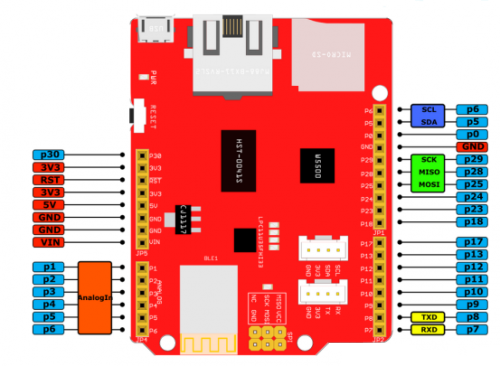
The Layout of Development Board Resources

Nordic NRF51822 is packaged in a module with a shield.
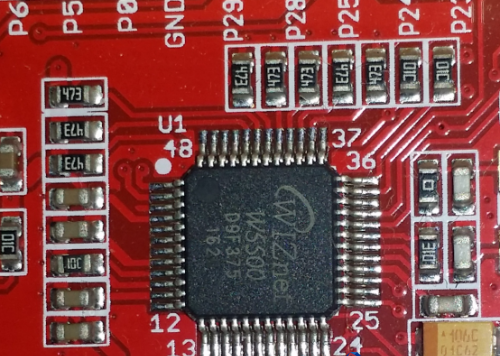
Ethernet interface :WIZnet W5500 program(W5500 through the SPI interface communicates with the NRF51822, which is widely applied to interface programs)

Arch Link main interface: USB Micro-B interface, Ethernet interface, MicroSD interface.

Sensor and the development board connection

Development board with mbed use
Connecting the computer and USB Micro B connector to creates a storage device
At the same time, the power light is lit and the Bluetooth lights flashing
The highlight is the support of mbed . Mbed is a prototype development platform for ARM processor, including free software library (SDK), hardware reference design (HDK) and three parts of online tools (Web)
♦ Power on the board and the use of mbed
1.First of all,log in by mbed .
You can use Import function to import the files or projects ,or use the search function to find your own files or project, and then import it to your own project.

2.Open the Import window, click the URL :
Https://developer.mbed.org/teams/znrobotics/code/Seeed_Arch_link_TempAndHumidity/
3.Select the import method for the project
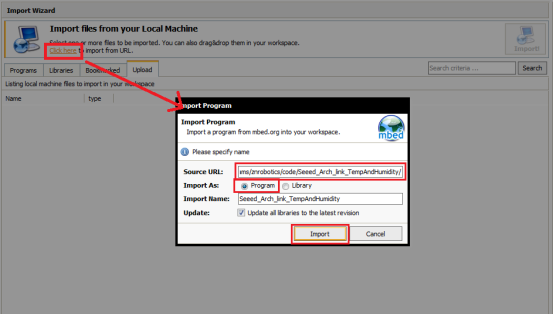
4.Click the compile icon to compile online.
The Compile is completed, no errors, and generated a hex file, then the pop-up hex file downloaded window.
5.Copy the downloaded hex file to the storage device. After that, press the reset button on the board.
The program starts running and opening the serial number by the serial port assistant with 9600 baud rate .As you can see, the temperature & humidity values were sent to the computer through the serial port.
Summary:
Arch Link support online IDE mbed for development, have a large number of rich C / C + + library can be used,which can greatly improve the efficiency of development t NRF51822 and W5500 are greatly enhanced its playability. MicroSD, although there are some restrictions on the rate, but its high-capacity storage can be useless in many projects. , Finally,you can connect more sensors, DIY up and handy because of its Compatible Arduino interface.
 Author :Darcy Beaufort — WIN SOURCE ELECTRONICS





